
Forum
»
Question for Misc computer gurus
- Results 1 to 11 of 11
-
Page 1 of 1
Thread: Question for Misc computer gurus
 02-05-2024, 07:56 PM
-
#1

- MajorTendonitis
- Join Date: Jan 2016
- Location: East Kootenays BC
- Age: 65
- Height: 5'8"
- Weight: 241 lbs
- Posts: 42,145
- Subscribers: 9
- Rep Power: 720922
-
-

Question for Misc computer gurus
This is a tough one . I have a new computer, windows 11 , i9 , 4090 gpu with 3 display ports .
I’m using it for gaming , and it’s going to be connected to a 34” UW oled display.
But I’d like to have dual 24” 16:9 monitors on another desk as a work station with a separate keyboard and mouse for photo editing.
Meaning two different work stations with one computer, one dedicated to gaming the other photoshop etc.
I do not want to do two things at once , it will either be gaming or photoshop. But I’m wondering if that will use resources for gaming when the gpu is also sending data to two other monitors? Or can you tell windows to only use the 34” when your gaming?
Also wondering if you can get your task bar on the work stations monitor, or will it only show up on one of the three ?
My computer guy has had two mouse’s and two keyboards hooked up to the same computer at once with no issues as long as your only using one at a time .
He figures if I used the same aspect ratio it may make things easier , but his theory is to sell me a second computer of course to make things less complicated .
I really don’t want to use my oled for photoshop , as there is the possibility of burn in , plus I’d like smaller dual monitors for editing.
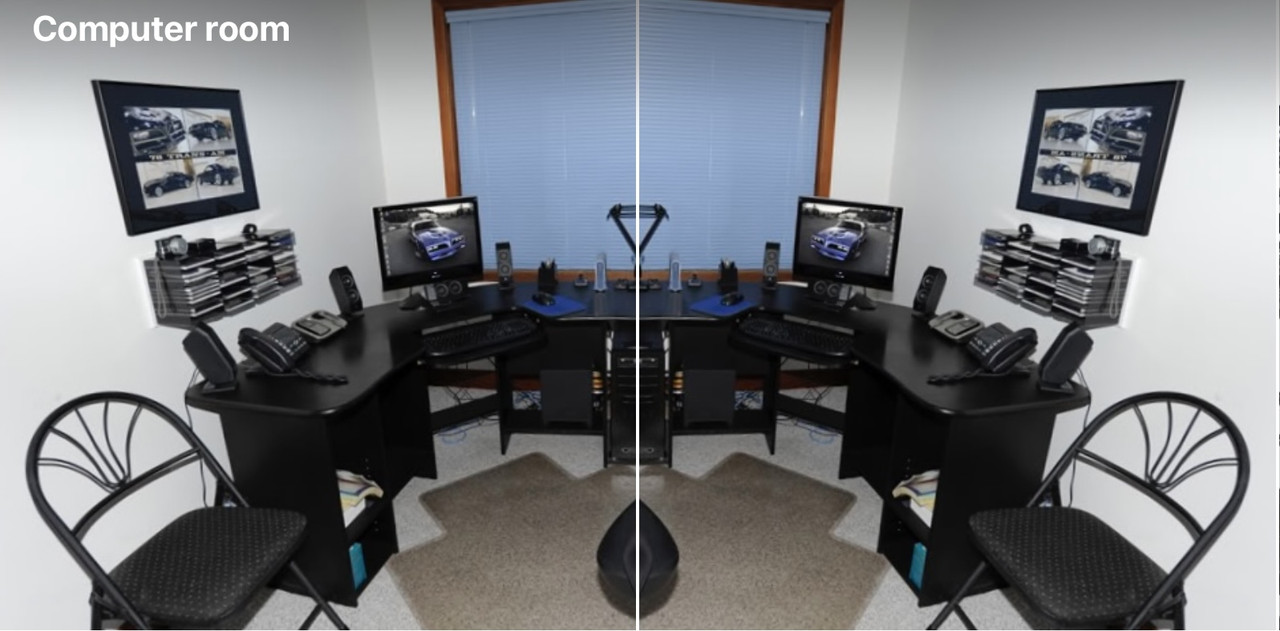
I’m using it for gaming , and it’s going to be connected to a 34” UW oled display.
But I’d like to have dual 24” 16:9 monitors on another desk as a work station with a separate keyboard and mouse for photo editing.
Meaning two different work stations with one computer, one dedicated to gaming the other photoshop etc.
I do not want to do two things at once , it will either be gaming or photoshop. But I’m wondering if that will use resources for gaming when the gpu is also sending data to two other monitors? Or can you tell windows to only use the 34” when your gaming?
Also wondering if you can get your task bar on the work stations monitor, or will it only show up on one of the three ?
My computer guy has had two mouse’s and two keyboards hooked up to the same computer at once with no issues as long as your only using one at a time .
He figures if I used the same aspect ratio it may make things easier , but his theory is to sell me a second computer of course to make things less complicated .
I really don’t want to use my oled for photoshop , as there is the possibility of burn in , plus I’d like smaller dual monitors for editing.
Back with my Fam
02-05-2024, 08:57 PM
-
#2

It's a pc playboy you can do whatever you want with it
Just get extra long cables
Multiple monitors won't really effect gaming. Have 4 monitors connected to my pc, I don't turn any off when gaming.
I used to have a second mouse and keyboard set up across the room on my racing sim. Just got some long ass usb extension cables.
Theres absolutely 0 reason to spend money on a 4090 pc and it won't do anything and everything. You don't need a second pc lol
Just get extra long cables
Multiple monitors won't really effect gaming. Have 4 monitors connected to my pc, I don't turn any off when gaming.
I used to have a second mouse and keyboard set up across the room on my racing sim. Just got some long ass usb extension cables.
Theres absolutely 0 reason to spend money on a 4090 pc and it won't do anything and everything. You don't need a second pc lol
02-05-2024, 09:04 PM
-
#3
- MajorTendonitis
- Join Date: Jan 2016
- Location: East Kootenays BC
- Age: 65
- Height: 5'8"
- Weight: 241 lbs
- Posts: 42,145
- Subscribers: 9
- Rep Power: 720922
-
-
Originally Posted By freeburn⏩
Well this is it , he just wants to sell me another computer. Was going to build another with the same case, rgb lighting , aio etc , but go with an i7 and 4070 super .It's a pc playboy you can do whatever you want with it
Just get extra long cables
Multiple monitors won't really effect gaming. Have 4 monitors connected to my pc, I don't turn any off when gaming.
I used to have a second mouse and keyboard set up across the room on my racing sim. Just got some long ass usb extension cables.
Theres absolutely 0 reason to spend money on a 4090 pc and it won't do anything and everything. You don't need a second pc lol
Just get extra long cables
Multiple monitors won't really effect gaming. Have 4 monitors connected to my pc, I don't turn any off when gaming.
I used to have a second mouse and keyboard set up across the room on my racing sim. Just got some long ass usb extension cables.
Theres absolutely 0 reason to spend money on a 4090 pc and it won't do anything and everything. You don't need a second pc lol
But I can’t see why a single computer can’t be used in two different locations as long as the cables get there .
There’s probably settings in windows to put the desk top and task bar on both work stations I’m assuming.
I’m still concerned about using resources as the gpu is sending data to all 3 monitors though .
Maybe there’s a way to turn off the other two display ports while you’re gaming ?
Back with my Fam
02-05-2024, 09:07 PM
-
#4
Originally Posted By MajorTendonitis⏩
Yeah you can just make the task bar show up on every screen, at the very worst you can just switch the main monitor in the settings with 1 clickWell this is it , he just wants to sell me another computer. Was going to build another with the same case, rgb lighting , aio etc , but go with an i7 and 4070 super .
But I can’t see why a single computer can’t be used in two different locations as long as the cables get there .
There’s probably settings in windows to put the desk top and task bar on both work stations I’m assuming
But I can’t see why a single computer can’t be used in two different locations as long as the cables get there .
There’s probably settings in windows to put the desk top and task bar on both work stations I’m assuming
02-05-2024, 09:58 PM
-
#5
- MajorTendonitis
- Join Date: Jan 2016
- Location: East Kootenays BC
- Age: 65
- Height: 5'8"
- Weight: 241 lbs
- Posts: 42,145
- Subscribers: 9
- Rep Power: 720922
-
-
Originally Posted By freeburn⏩
Thanks bruh ,reps for lifeYeah you can just make the task bar show up on every screen, at the very worst you can just switch the main monitor in the settings with 1 click
Back with my Fam
02-05-2024, 11:18 PM
-
#6
- nkiritsis13
- [_]Living [X]Living Dead
-

- nkiritsis13
- [_]Living [X]Living Dead
- Join Date: Apr 2010
- Location: Rochester, Michigan, United States
- Posts: 8,312
- Rep Power: 331479
-
-

Originally Posted By MajorTendonitis⏩
Let's say that you're running a game, which is an example of a task that is GPU-intensive.Well this is it , he just wants to sell me another computer. Was going to build another with the same case, rgb lighting , aio etc , but go with an i7 and 4070 super .
But I can’t see why a single computer can’t be used in two different locations as long as the cables get there .
There’s probably settings in windows to put the desk top and task bar on both work stations I’m assuming.
I’m still concerned about using resources as the gpu is sending data to all 3 monitors though .
Maybe there’s a way to turn off the other two display ports while you’re gaming ?
But I can’t see why a single computer can’t be used in two different locations as long as the cables get there .
There’s probably settings in windows to put the desk top and task bar on both work stations I’m assuming.
I’m still concerned about using resources as the gpu is sending data to all 3 monitors though .
Maybe there’s a way to turn off the other two display ports while you’re gaming ?
The game is only going to open in its own window on your main display, so it's not going to be replicating the task across all displays - that's the key. You could even run the game while having a browser open or whatever else you want in the others, all simultaneously without a problem. Simply displayingwhateveris not GPU intensive at all, as it's only the specific tasks you're doing and the applications themselves that can actually hammer the GPU.
I'm on an old-as-shít PC at the moment and I'll have multiple instances of Blender, GIMP, Photoshop, browser windows with a hundred tabs, ect. all running and still play games without a problem. I even have my audio through a receiver connected to the GPU via HDMI, which Windows then "sees" as another monitor, but still no problems.
A single modern, high end computer will have zero issues handling multiple displays with multitasking to boot.
I will stand firm, I refuse to kneel - The fury in me is divine
My dark grave awaits, my fate is revealed - But I'm not afraid to die
If you have any problems or need advice, feel free to ask
02-06-2024, 12:17 AM
-
#7
- MajorTendonitis
- Join Date: Jan 2016
- Location: East Kootenays BC
- Age: 65
- Height: 5'8"
- Weight: 241 lbs
- Posts: 42,145
- Subscribers: 9
- Rep Power: 720922
-
-
Originally Posted By nkiritsis13⏩
Thx 4 the reply . My computer guy is also worried about the aspect ratio being different. I know in the old days if you had dual monitors with different aspect ratios , that they usually had issues .Let's say that you're running a game, which is an example of a task that is GPU-intensive.
The game is only going to open in its own window on your main display, so it's not going to be replicating the task across all displays - that's the key. You could even run the game while having a browser open or whatever else you want in the others, all simultaneously without a problem. Simply displayingwhateveris not GPU intensive at all, as it's only the specific tasks you're doing and the applications themselves that can actually hammer the GPU.
I'm on an old-as-shít PC at the moment and I'll have multiple instances of Blender, GIMP, Photoshop, browser windows with a hundred tabs, ect. all running and still play games without a problem. I even have my audio through a receiver connected to the GPU via HDMI, which Windows then "sees" as another monitor, but still no problems.
A single modern, high end computer will have zero issues handling multiple displays with multitasking to boot.
The game is only going to open in its own window on your main display, so it's not going to be replicating the task across all displays - that's the key. You could even run the game while having a browser open or whatever else you want in the others, all simultaneously without a problem. Simply displayingwhateveris not GPU intensive at all, as it's only the specific tasks you're doing and the applications themselves that can actually hammer the GPU.
I'm on an old-as-shít PC at the moment and I'll have multiple instances of Blender, GIMP, Photoshop, browser windows with a hundred tabs, ect. all running and still play games without a problem. I even have my audio through a receiver connected to the GPU via HDMI, which Windows then "sees" as another monitor, but still no problems.
A single modern, high end computer will have zero issues handling multiple displays with multitasking to boot.
My main with be a 34” 21:9 ,and the other workstation will be dual 24” 16:9 aspect ratio monitors . No issues next time you boot up ?
Back with my Fam
02-06-2024, 10:49 AM
-
#8
- nkiritsis13
- [_]Living [X]Living Dead
-
- nkiritsis13
- [_]Living [X]Living Dead
- Join Date: Apr 2010
- Location: Rochester, Michigan, United States
- Posts: 8,312
- Rep Power: 331479
-
-
Originally Posted By MajorTendonitis⏩
You shouldn't run into any problems, and if you do, it would be a simple matter of going through the Windows settings and making sure everything is loaded up correctly, but it should auto-detect everything fine.Thx 4 the reply . My computer guy is also worried about the aspect ratio being different. I know in the old days if you had dual monitors with different aspect ratios , that they usually had issues .
My main with be a 34” 21:9 ,and the other workstation will be dual 24” 16:9 aspect ratio monitors . No issues next time you boot up ?
My main with be a 34” 21:9 ,and the other workstation will be dual 24” 16:9 aspect ratio monitors . No issues next time you boot up ?
E.g.:
https://www.digitaltrends.com/comput...ng-resolutions
Speaking for myself, I haven't run into any problems, and I'm running one monitor alongside the receiver, which Ithenhave as a passthrough to a second receiver for when I want to use it for audio in another room that puts the first monitor on standby. That alone should confuse the hell out of Windows (10), but everything works pretty smoothly.
The thing with Windows is that under the display settings, you have plenty of control. So for the case of receivers being detected as monitors despite not being one, there's an invisible "screen" that you can interact with, including under the display settings. I could literally move the second "display" off to nowhere so I could never accidentally click into it. Point being, you have tons of control for more complex setups and shouldn't run into any problems, and if you do, they should not be difficult to sort out once.
I will stand firm, I refuse to kneel - The fury in me is divine
My dark grave awaits, my fate is revealed - But I'm not afraid to die
If you have any problems or need advice, feel free to ask
02-06-2024, 10:55 AM
-
#9
Originally Posted By nkiritsis13⏩
It's been a while but I used to run my reciever thru hdmi to my pc. I ended up needing the hdmi port tho so, I switched to an amp using optical from the pcYou shouldn't run into any problems, and if you do, it would be a simple matter of going through the Windows settings and making sure everything is loaded up correctly, but it should auto-detect everything fine.
E.g.:
https://www.digitaltrends.com/comput...ng-resolutions
Speaking for myself, I haven't run into any problems, and I'm running one monitor alongside the receiver, which Ithenhave as a passthrough to a second receiver for when I want to use it for audio in another room that puts the first monitor on standby. That alone should confuse the hell out of Windows (10), but everything works pretty smoothly.
The thing with Windows is that under the display settings, you have plenty of control. So for the case of receivers being detected as monitors despite not being one, there's an invisible "screen" that you can interact with, including under the display settings. I could literally move the second "display" off to nowhere so I could never accidentally click into it. Point being, you have tons of control for more complex setups and shouldn't run into any problems, and if you do, they should not be difficult to sort out once.
E.g.:
https://www.digitaltrends.com/comput...ng-resolutions
Speaking for myself, I haven't run into any problems, and I'm running one monitor alongside the receiver, which Ithenhave as a passthrough to a second receiver for when I want to use it for audio in another room that puts the first monitor on standby. That alone should confuse the hell out of Windows (10), but everything works pretty smoothly.
The thing with Windows is that under the display settings, you have plenty of control. So for the case of receivers being detected as monitors despite not being one, there's an invisible "screen" that you can interact with, including under the display settings. I could literally move the second "display" off to nowhere so I could never accidentally click into it. Point being, you have tons of control for more complex setups and shouldn't run into any problems, and if you do, they should not be difficult to sort out once.
It may be worth checking out windows 11. W11 seems to handle multiple monitors and audio settings much better than 10.
I just caved in and switched to 11 this weekend after reading the gaming oled subreddit. Everyone there swore windows 11 was alot better for hdr/oled/multiple monitors. They were Def correct.
I can't say for certain that it will be much different for the woes of running a reciever with hdmi and your computer thinking it's a screen, but could be worth looking into.
But perhaps the best course is just the classic... If it ain't broke don't fix it... If you got a setup working fine for you just leave it alone lolol
02-06-2024, 11:29 AM
-
#10
- MajorTendonitis
- Join Date: Jan 2016
- Location: East Kootenays BC
- Age: 65
- Height: 5'8"
- Weight: 241 lbs
- Posts: 42,145
- Subscribers: 9
- Rep Power: 720922
-
-
Btw thanks for the info guys,much appreciated. I’ve been out of the loop for over a decade , so it’s not surprising I’m a little confused on the subject.
I needed this information, as it’s going to dictate the outcome of my computer desk design
I needed this information, as it’s going to dictate the outcome of my computer desk design
Back with my Fam
02-07-2024, 06:49 PM
-
#11
- nkiritsis13
- [_]Living [X]Living Dead
-
- nkiritsis13
- [_]Living [X]Living Dead
- Join Date: Apr 2010
- Location: Rochester, Michigan, United States
- Posts: 8,312
- Rep Power: 331479
-
-
Originally Posted By MajorTendonitis⏩
Any time man, this stuff can get confusing, so don't hesitate to ask.Btw thanks for the info guys,much appreciated. I’ve been out of the loop for over a decade , so it’s not surprising I’m a little confused on the subject.
I needed this information, as it’s going to dictate the outcome of my computer desk design
I needed this information, as it’s going to dictate the outcome of my computer desk design
I will stand firm, I refuse to kneel - The fury in me is divine
My dark grave awaits, my fate is revealed - But I'm not afraid to die
If you have any problems or need advice, feel free to ask
Bookmarks
-

- Digg
-

- del.icio.us
-

- StumbleUpon
-

-

Posting Permissions
- You may not post new threads
- You may not post replies
- You may not post attachments
- You may not edit your posts