
Forum
»
Why are 1440p monitors so blurry?
- Results 1 to 17 of 17
-
Page 1 of 1
 02-10-2024, 01:58 PM
-
#1

Why are 1440p monitors so blurry?
I have a 27 inch 1440p monitor and the text and gameplay is blurry. Looks no better than 1080p on a 24 inch screen despite being 109 PPI or whatever.
PC specs
i9 9900k/AMD RX 6800 16 GB/16 GB RAM/LG BX 65'' OLED/Gigabyte GS27QC 27''
OLED Master Race crew
1440p 120+ fps only crew
6'2 master race crew
Audiophile crew
Metal crew
Introvert/INTJ crew
German crew
If you aren't getting stronger you aren't getting bigger crew
02-10-2024, 02:01 PM
-
#2
- rollerball
- Banned
-

- rollerball
- Banned
- Join Date: Apr 2012
- Location: United States
- Posts: 38,872
- Rep Power: 214
-
-

Post deleted by user
02-10-2024, 02:05 PM
-
#3
Originally Posted By rollerball⏩
The text is brutal, i have a headache. How is this acceptable in 2024?I love my Alienware QD-OLED 27" 360hz monitor for movies and gaming. Seems sharp and clear and incredibly colorful and bright to me.
For text not so much. And obviously 4k would be sharper but mine still seems sharp and clear so maybe your monitor sucks.
For text not so much. And obviously 4k would be sharper but mine still seems sharp and clear so maybe your monitor sucks.
I have an old 24'' 1080p monitor that isn't even this blurry.
PC specs
i9 9900k/AMD RX 6800 16 GB/16 GB RAM/LG BX 65'' OLED/Gigabyte GS27QC 27''
OLED Master Race crew
1440p 120+ fps only crew
6'2 master race crew
Audiophile crew
Metal crew
Introvert/INTJ crew
German crew
If you aren't getting stronger you aren't getting bigger crew
02-10-2024, 02:07 PM
-
#4

- MajorTendonitis
- Join Date: Jan 2016
- Location: East Kootenays BC
- Age: 65
- Height: 5'8"
- Weight: 241 lbs
- Posts: 41,978
- Subscribers: 8
- Rep Power: 715142
-
-

I have an Alienware 34” ultra wide QD Oled 1440 , and some people do complain about the text . Apparently the way the pixels are laid out can affect the text with oleds . I don’t find the text as clear as I did with my old 1080 24” monitors
Back with my Fam
02-10-2024, 02:08 PM
-
#5

Originally Posted By MajorTendonitis⏩
that's an oled thing tho not really a resolution thingI have an Alienware 34” Oled 1440 , and some people do complain about the text . Apparently the way the pixels are laid out can affect the text with oleds . I don’t find the text as clear as I did with my old 1080 24” monitors
Oleds have some issue with text
02-10-2024, 02:09 PM
-
#6
- MajorTendonitis
- Join Date: Jan 2016
- Location: East Kootenays BC
- Age: 65
- Height: 5'8"
- Weight: 241 lbs
- Posts: 41,978
- Subscribers: 8
- Rep Power: 715142
-
-
Originally Posted By freeburn⏩
Yes exactly, it’s not the pixel density,it’s the way the pixels are arranged , well at least from the reviews I’ve seen.that's an oled thing tho not really a resolution thing
Oleds have some issue with text
Oleds have some issue with text
I only mentioned specs for reference.
I bought mine strictly for gaming , and will probably run two 24” or 27” LCD’s for photo editing
Back with my Fam
02-10-2024, 02:14 PM
-
#7
- rollerball
- Banned
-
- rollerball
- Banned
- Join Date: Apr 2012
- Location: United States
- Posts: 38,872
- Rep Power: 214
-
-
Post deleted by user
02-10-2024, 02:18 PM
-
#8
Originally Posted By MajorTendonitis⏩
I wonder if we are sitting too close. I'm like 2.5 feet from mine. At 4 feet it looks better.I have an Alienware 34” ultra wide QD Oled 1440 , and some people do complain about the text . Apparently the way the pixels are laid out can affect the text with oleds . I don’t find the text as clear as I did with my old 1080 24” monitors
PC specs
i9 9900k/AMD RX 6800 16 GB/16 GB RAM/LG BX 65'' OLED/Gigabyte GS27QC 27''
OLED Master Race crew
1440p 120+ fps only crew
6'2 master race crew
Audiophile crew
Metal crew
Introvert/INTJ crew
German crew
If you aren't getting stronger you aren't getting bigger crew
02-10-2024, 02:23 PM
-
#9
- MajorTendonitis
- Join Date: Jan 2016
- Location: East Kootenays BC
- Age: 65
- Height: 5'8"
- Weight: 241 lbs
- Posts: 41,978
- Subscribers: 8
- Rep Power: 715142
-
-
Originally Posted By eod8989⏩
I’m around 28” , and use reading glasses to match the distance. I don’t find the text as clean at any distance compared to my old lcd screens .I wonder if we are sitting too close. I'm like 2.5 feet from mine. At 4 feet it looks better.
It’s just a design flaw of oled panels . Great for gaming though
Back with my Fam
02-10-2024, 02:27 PM
-
#10
Originally Posted By MajorTendonitis⏩
Mine is VA and has the same text issues. Yeah it's not nearly as noticeable in gaming, i think i am just sitting a bit too close tbh. It has a thick back panel and curved so it sticks out several inches from the wall.I’m around 28” , and use reading glasses to match the distance. I don’t find the text as clean at any distance compared to my old lcd screens .
It’s just a design flaw of oled panels . Great for gaming though
It’s just a design flaw of oled panels . Great for gaming though
PC specs
i9 9900k/AMD RX 6800 16 GB/16 GB RAM/LG BX 65'' OLED/Gigabyte GS27QC 27''
OLED Master Race crew
1440p 120+ fps only crew
6'2 master race crew
Audiophile crew
Metal crew
Introvert/INTJ crew
German crew
If you aren't getting stronger you aren't getting bigger crew
02-10-2024, 02:35 PM
-
#11
- rollerball
- Banned
-
- rollerball
- Banned
- Join Date: Apr 2012
- Location: United States
- Posts: 38,872
- Rep Power: 214
-
-
Post deleted by user
02-10-2024, 02:44 PM
-
#12
Originally Posted By rollerball⏩
I can't afford something better right now. 4k gaming is getting ridiculously expensive which is part of the reason i downgraded. I also refuse to go any higher than 27 inches for a desktop monitor. So i'll have to wait until i can blow $800 on a 4k 144hz one.It's time to let that obsolete chit go and upgrade dude. Your current monitor and TV set-up is old and poverty at this point.
PC specs
i9 9900k/AMD RX 6800 16 GB/16 GB RAM/LG BX 65'' OLED/Gigabyte GS27QC 27''
OLED Master Race crew
1440p 120+ fps only crew
6'2 master race crew
Audiophile crew
Metal crew
Introvert/INTJ crew
German crew
If you aren't getting stronger you aren't getting bigger crew
02-10-2024, 02:58 PM
-
#13
Ok so turns out the blurry text is only on some stuff in google chrome. Everything else it seems to be pretty sharp. Weird.
PC specs
i9 9900k/AMD RX 6800 16 GB/16 GB RAM/LG BX 65'' OLED/Gigabyte GS27QC 27''
OLED Master Race crew
1440p 120+ fps only crew
6'2 master race crew
Audiophile crew
Metal crew
Introvert/INTJ crew
German crew
If you aren't getting stronger you aren't getting bigger crew
02-10-2024, 03:33 PM
-
#14

Originally Posted By eod8989⏩
Sometimes applications are kinda weird with high resolutions.Ok so turns out the blurry text is only on some stuff in google chrome. Everything else it seems to be pretty sharp. Weird.
02-10-2024, 03:33 PM
-
#15
- angelfire2005
- Registered User
-

- angelfire2005
- Registered User
- Join Date: Oct 2005
- Location: Georgia, United States
- Posts: 8,194
- Rep Power: 17290
-
-
Originally Posted By eod8989⏩
your monitor could have a BGR subpixel layout, instead of the standard RGB layout. it can cause only text to look blurryOk so turns out the blurry text is only on some stuff in google chrome. Everything else it seems to be pretty sharp. Weird.
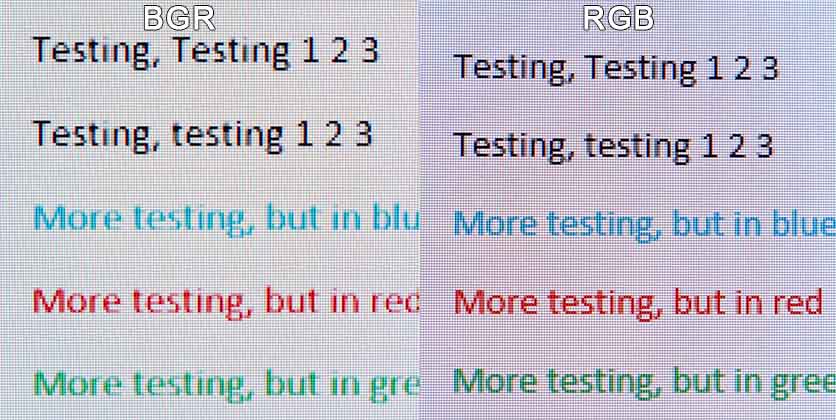
hiya
PSN: med171
02-10-2024, 10:17 PM
-
#16

- OptimusTrajan
- Join Date: Oct 2013
- Posts: 14,061
- Subscribers: 2
- Rep Power: 123510
-
-
32" 1440p is the same as 24" 1080p.
It's because you have an oled.
It's because you have an oled.
02-11-2024, 07:43 PM
-
#17
- nkiritsis13
- [_]Living [X]Living Dead
-

- nkiritsis13
- [_]Living [X]Living Dead
- Join Date: Apr 2010
- Location: Rochester, Michigan, United States
- Posts: 8,312
- Rep Power: 331479
-
-
It's because of resolution and screen size. The bigger your screen, the higher the resolution you're going to need at the same distance.
For example, a long while back I was shopping between two similar 1440p monitors, one 27" and the other 32" (or something in that range). The latter looked noticeably worse despite them otherwise being 1440p because it's still the same amount of pixels, except one has to cover a larger area so they become more visible at the same distance. If I stood back further, it would probably look fine, but I don't use my computer at that distance, so I went with the 27" that fits my field of view better anyways on top of looking better with no visible pixels/blurriness.
Another really important thing to do if you're changing monitors is to go into the Windows settings and make sure everything is set to the correct resolution, font scaling, and to also go through re-calibrating the display so the colors show properly.
For example, a long while back I was shopping between two similar 1440p monitors, one 27" and the other 32" (or something in that range). The latter looked noticeably worse despite them otherwise being 1440p because it's still the same amount of pixels, except one has to cover a larger area so they become more visible at the same distance. If I stood back further, it would probably look fine, but I don't use my computer at that distance, so I went with the 27" that fits my field of view better anyways on top of looking better with no visible pixels/blurriness.
Another really important thing to do if you're changing monitors is to go into the Windows settings and make sure everything is set to the correct resolution, font scaling, and to also go through re-calibrating the display so the colors show properly.
I will stand firm, I refuse to kneel - The fury in me is divine
My dark grave awaits, my fate is revealed - But I'm not afraid to die
If you have any problems or need advice, feel free to ask
Bookmarks
-

- Digg
-

- del.icio.us
-

- StumbleUpon
-

-

Posting Permissions
- You may not post new threads
- You may not post replies
- You may not post attachments
- You may not edit your posts