
Forum
»
Computer monitor refuses to go to sleep since updates
- Results 1 to 13 of 13
-
Page 1 of 1
 02-16-2024, 12:40 AM
-
#1

- MajorTendonitis
- Join Date: Jan 2016
- Location: East Kootenays BC
- Age: 65
- Height: 5'8"
- Weight: 241 lbs
- Posts: 42,143
- Subscribers: 9
- Rep Power: 720859
-
-

Computer monitor refuses to go to sleep since updates
Fark srs this is pissing me off . Everything was fine , now my monitor won’t go into sleep mode anymore and stays on desktop when my computer’s idle .
It was recommended by my computer guy that I update the drivers in the Dell monitor when it came in .
It’s a 34” QD oled ultra wide from dell . Everything acted normal ,but now regardless of settings it just stays on desktop.
It does go off normally when you shut off the computer, no issues there . Im using windows 11 , and the computer is new with a 4090 GeForce graphics card , but I don’t know why the graphics card would be causing this , unless there’s some kind of coincidence?
Regardless of where I put the settings the monitor stays on desktop at idle .
Here’s the settings I tried below , no change
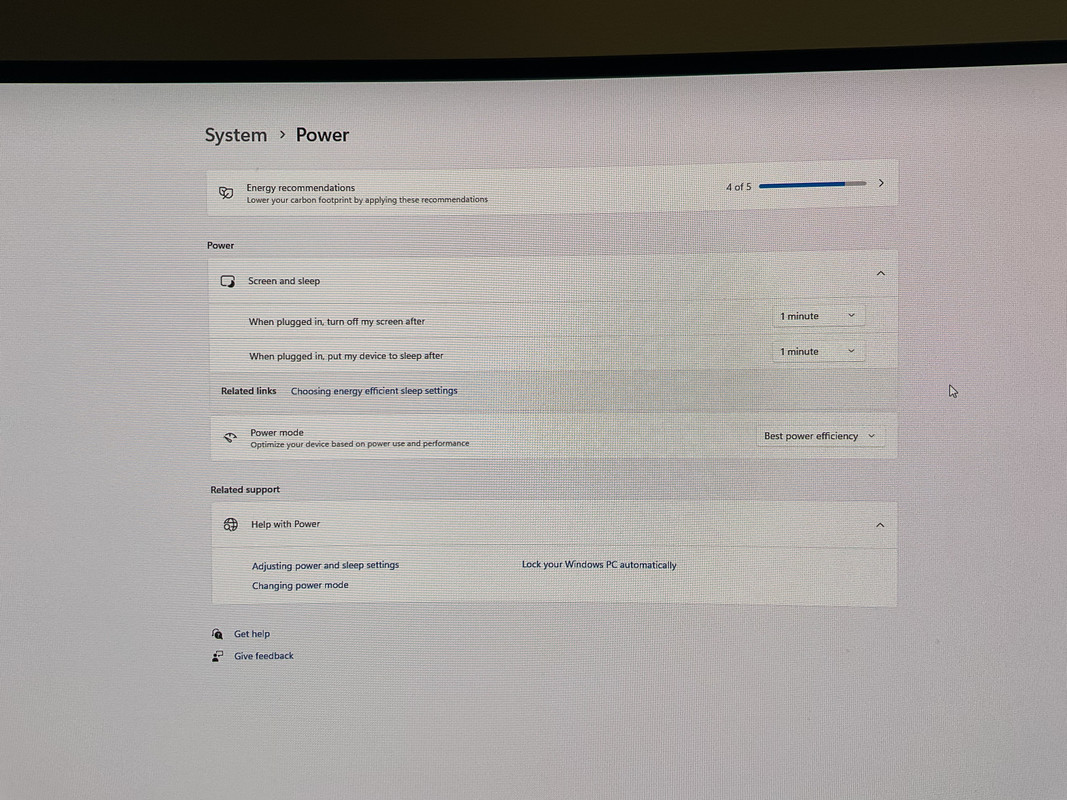
I normally had it set to plugged in , put my device to sleep never .
Nothing seems to make a difference.
Not really sure how to roll the drivers back . I guess I should have set a time to set the computer back to
It was recommended by my computer guy that I update the drivers in the Dell monitor when it came in .
It’s a 34” QD oled ultra wide from dell . Everything acted normal ,but now regardless of settings it just stays on desktop.
It does go off normally when you shut off the computer, no issues there . Im using windows 11 , and the computer is new with a 4090 GeForce graphics card , but I don’t know why the graphics card would be causing this , unless there’s some kind of coincidence?
Regardless of where I put the settings the monitor stays on desktop at idle .
Here’s the settings I tried below , no change
I normally had it set to plugged in , put my device to sleep never .
Nothing seems to make a difference.
Not really sure how to roll the drivers back . I guess I should have set a time to set the computer back to
Back with my Fam
02-16-2024, 05:35 AM
-
#2
- nkiritsis13
- [_]Living [X]Living Dead
-

- nkiritsis13
- [_]Living [X]Living Dead
- Join Date: Apr 2010
- Location: Rochester, Michigan, United States
- Posts: 8,312
- Rep Power: 331479
-
-
Assuming this isn't a monitor issue, whenever I get this, the first step I've learned to do is check if something is keeping it awake:
1. Open an elevated command prompt (right click and run as administrator)
2. type in: powercfg -requests
You'll get a window like this (random google image)

From there you can narrow it down to what might be preventing the monitor from sleeping.
Like in this example, something is using the Nvidia driver. In my case, I have my receiver hooked up via hdmi to the GPU, so something might be using audio.
I don't know how Windows 11's audio manager(s?) work, but if you can see if there is some obscure application with its own volume meter, that might be playing a nonexistent sound that keeps the monitor from sleeping. Like one time Blender randomly decided it was going to "play" audio, so I had to turn off audio devices in Blender.
I've also had browser windows get in the way, and closing them instantly fixed it, or even closing my music player application despite it not currently playing anything.
1. Open an elevated command prompt (right click and run as administrator)
2. type in: powercfg -requests
You'll get a window like this (random google image)
From there you can narrow it down to what might be preventing the monitor from sleeping.
Like in this example, something is using the Nvidia driver. In my case, I have my receiver hooked up via hdmi to the GPU, so something might be using audio.
I don't know how Windows 11's audio manager(s?) work, but if you can see if there is some obscure application with its own volume meter, that might be playing a nonexistent sound that keeps the monitor from sleeping. Like one time Blender randomly decided it was going to "play" audio, so I had to turn off audio devices in Blender.
I've also had browser windows get in the way, and closing them instantly fixed it, or even closing my music player application despite it not currently playing anything.
I will stand firm, I refuse to kneel - The fury in me is divine
My dark grave awaits, my fate is revealed - But I'm not afraid to die
If you have any problems or need advice, feel free to ask
02-16-2024, 02:19 PM
-
#3
- MajorTendonitis
- Join Date: Jan 2016
- Location: East Kootenays BC
- Age: 65
- Height: 5'8"
- Weight: 241 lbs
- Posts: 42,143
- Subscribers: 9
- Rep Power: 720859
-
-
Thx 4 the info , I actually read a thing about what you mentioned for the command prompt to see if anything is running in the background. Will check and report back
Interesting, video wake lock ?
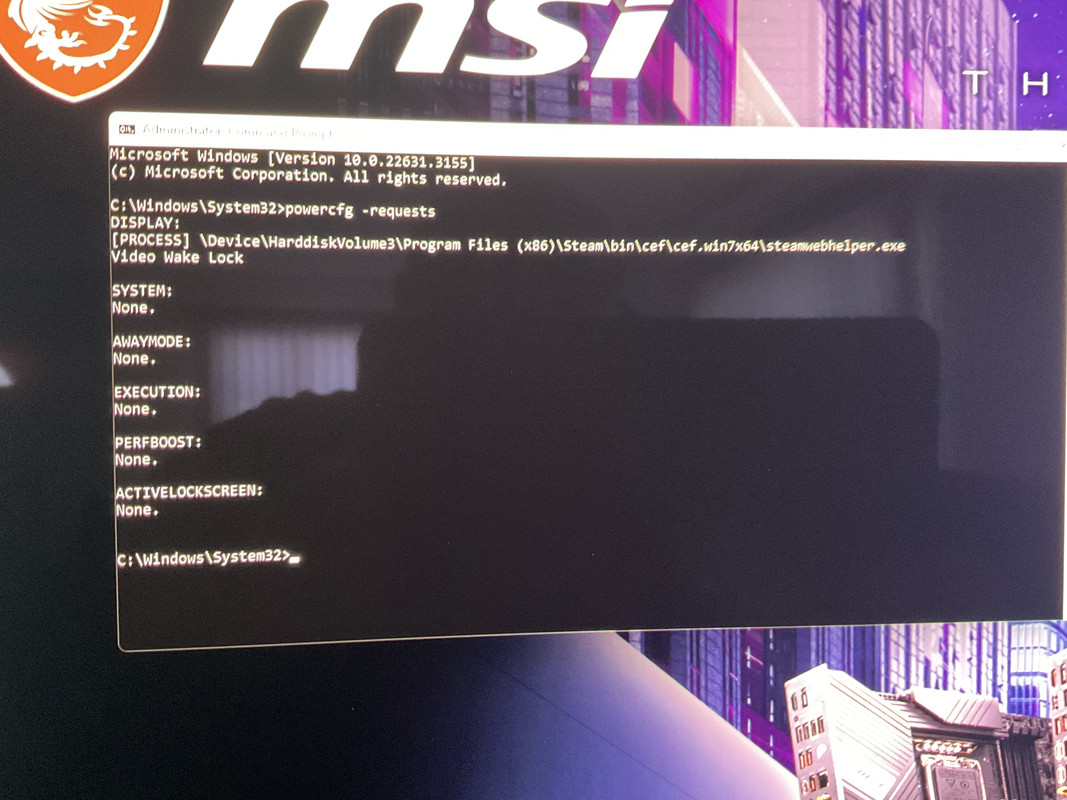
Interesting, video wake lock ?
Back with my Fam
02-16-2024, 02:40 PM
-
#4
 02-16-2024, 05:15 PM
-
#5
- MajorTendonitis
- Join Date: Jan 2016
- Location: East Kootenays BC
- Age: 65
- Height: 5'8"
- Weight: 241 lbs
- Posts: 42,143
- Subscribers: 9
- Rep Power: 720859
-
-
Originally Posted By freeburn⏩
Good idea I should see if I can figure that out also . Gotta say I’ve been out of the loop for 14 years , as I’ve just been using an iPad for just checking out the Misc etc .Could also be a setting in the monitors software menu unrelated to windows?
Back with my Fam
02-16-2024, 05:20 PM
-
#6

- OptimusTrajan
- Join Date: Oct 2013
- Posts: 14,109
- Subscribers: 2
- Rep Power: 124159
-
-
Check your monitors menu for a deep sleep mode.
02-16-2024, 05:30 PM
-
#7
- BullittEV
- Registered User
-

- BullittEV
- Registered User
- Join Date: Nov 2012
- Location: San Diego, California, United States
- Age: 40
- Posts: 27,652
- Rep Power: 261167
-
-
Originally Posted By OptimusTrajan⏩
This, sometimes theres an auto-feature thats on.Check your monitors menu for a deep sleep mode.
Something as simple as the monitor menu setting.
USMC 0311
*Ice Hockey/Lacrosse Crew*
*fukkin zeezbrah when pickin up chicks but do one thing to fuk it up/cant sustain after that night crew*
*C7 GS Vette Crew*
02-16-2024, 05:34 PM
-
#8
- MajorTendonitis
- Join Date: Jan 2016
- Location: East Kootenays BC
- Age: 65
- Height: 5'8"
- Weight: 241 lbs
- Posts: 42,143
- Subscribers: 9
- Rep Power: 720859
-
-
This is what’s running in the background . Steam seems to be on ,not sure if it has anything to with it
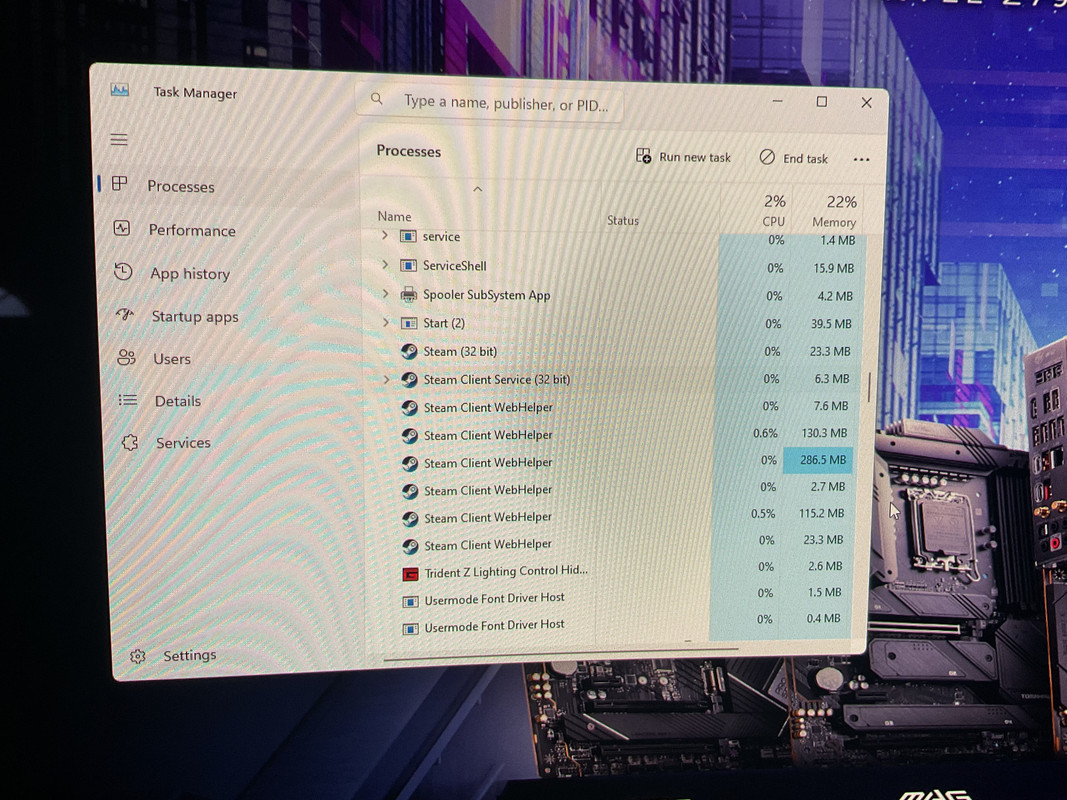
Back with my Fam
02-16-2024, 05:37 PM
-
#9
 02-16-2024, 06:12 PM
-
#10
- MajorTendonitis
- Join Date: Jan 2016
- Location: East Kootenays BC
- Age: 65
- Height: 5'8"
- Weight: 241 lbs
- Posts: 42,143
- Subscribers: 9
- Rep Power: 720859
-
-
Originally Posted By nkiritsis13⏩
Good call , I went to the right hand side of the task bar and closed Steam . I guess it was running in the background as shown in the command prompt .Assuming this isn't a monitor issue, whenever I get this, the first step I've learned to do is check if something is keeping it awake:
1. Open an elevated command prompt (right click and run as administrator)
2. type in: powercfg -requests
You'll get a window like this (random google image)
From there you can narrow it down to what might be preventing the monitor from sleeping.
Like in this example, something is using the Nvidia driver. In my case, I have my receiver hooked up via hdmi to the GPU, so something might be using audio.
I don't know how Windows 11's audio manager(s?) work, but if you can see if there is some obscure application with its own volume meter, that might be playing a nonexistent sound that keeps the monitor from sleeping. Like one time Blender randomly decided it was going to "play" audio, so I had to turn off audio devices in Blender.
I've also had browser windows get in the way, and closing them instantly fixed it, or even closing my music player application despite it not currently playing anything.
1. Open an elevated command prompt (right click and run as administrator)
2. type in: powercfg -requests
You'll get a window like this (random google image)
From there you can narrow it down to what might be preventing the monitor from sleeping.
Like in this example, something is using the Nvidia driver. In my case, I have my receiver hooked up via hdmi to the GPU, so something might be using audio.
I don't know how Windows 11's audio manager(s?) work, but if you can see if there is some obscure application with its own volume meter, that might be playing a nonexistent sound that keeps the monitor from sleeping. Like one time Blender randomly decided it was going to "play" audio, so I had to turn off audio devices in Blender.
I've also had browser windows get in the way, and closing them instantly fixed it, or even closing my music player application despite it not currently playing anything.
Thanks everyone . Amazing how a little thing can cause so much grief if you’re a noob like me.
Update :
ok now my games starting from the beginning, weird . I did get back to where I was at ,but at the beginning of the mission . Kind of missing the old days ,as this is getting more complicated
Update 2 : ok shut the game down and I see Steam running in the background if I click on it on the right of the task bar , but now the screen is going to sleep normally. If it ain’t broke
Back with my Fam
02-16-2024, 11:26 PM
-
#11
- OptimusTrajan
- Join Date: Oct 2013
- Posts: 14,109
- Subscribers: 2
- Rep Power: 124159
-
-
Originally Posted By Coal
Yup. Consoles are for stupid poor people.So easy a caveman can do it
02-16-2024, 11:40 PM
-
#12
Originally Posted By OptimusTrajan⏩
Yep true we constantly make threads on the misc asking how to get our system to work.Yup. Consoles are for stupid poor people.
▬▬▬▬▬▬▬▬▬▬▬ஜ۩۞۩ஜ▬▬▬▬▬▬▬▬▬▬▬▬
......................
02-17-2024, 06:32 AM
-
#13
- nkiritsis13
- [_]Living [X]Living Dead
-
- nkiritsis13
- [_]Living [X]Living Dead
- Join Date: Apr 2010
- Location: Rochester, Michigan, United States
- Posts: 8,312
- Rep Power: 331479
-
-
I looked up the steam wake lock thing:
https://steamcommunity.com/groups/St...4023690069191/
My guess is that you might have Steam set to show the store page (I have mine on Library, which is in the setings), and there is some video playing on one of the listings that activates the wake lock.
Browsers do the same thing, and Steam basically acts like a browser (that API thing in the link), so even if it's minimized/in the background, it's like a video playing that prevents the monitor from sleeping.
Try changing the settings to show your game library at startup instead of the store and see if that helps.
https://steamcommunity.com/groups/St...4023690069191/
My guess is that you might have Steam set to show the store page (I have mine on Library, which is in the setings), and there is some video playing on one of the listings that activates the wake lock.
Browsers do the same thing, and Steam basically acts like a browser (that API thing in the link), so even if it's minimized/in the background, it's like a video playing that prevents the monitor from sleeping.
Try changing the settings to show your game library at startup instead of the store and see if that helps.
I will stand firm, I refuse to kneel - The fury in me is divine
My dark grave awaits, my fate is revealed - But I'm not afraid to die
If you have any problems or need advice, feel free to ask
Bookmarks
-

- Digg
-

- del.icio.us
-

- StumbleUpon
-

-

Posting Permissions
- You may not post new threads
- You may not post replies
- You may not post attachments
- You may not edit your posts