
Forum
»
Reboot and select proper boot device or insert media in selected boot device
- Results 1 to 16 of 16
-
Page 1 of 1
 06-20-2020, 03:45 PM
-
#1
- A-GAME
- Pedicabo ego vos et irrum
-

- A-GAME
- Pedicabo ego vos et irrum
- Join Date: Nov 2006
- Posts: 47,648
- Rep Power: 280053
-
-

Reboot and select proper boot device or insert media in selected boot device
WTF is this shyt? For the past week, every time I turn on my pc I get this error message. I have to restart my comp several times before it actually works. I tried a bunch of troubleshoot suggestions but to no avail. Then yesterday I completely formatted and the problem persists. Do any of you kunts know what's causing this? Is my disk fukt or something? I only know about incels and not lifting. For your time...




Still Cuckin On Four Fours, Wrapped In Four Voes
06-20-2020, 03:47 PM
-
#2
- Burgerbuger
- Ceo
-

- Burgerbuger
- Ceo
- Join Date: Oct 2006
- Location: Yukon, Oklahoma, United States
- Age: 41
- Posts: 11,060
- Rep Power: 14851
-
-
Time for a new hard drive bucko
Kindness is all that matters in life
06-20-2020, 03:50 PM
-
#3
- DizzySmalls
- Fast Misc
-

- DizzySmalls
- Fast Misc
- Join Date: May 2012
- Location: United States
- Posts: 23,894
- Rep Power: 82068
-
-
Do you have more than one hard drive? Do you have any external storage devices inserted at boot?
06-20-2020, 03:52 PM
-
#4
- zhengterry
- Banned
-

- zhengterry
- Banned
- Join Date: Jul 2015
- Age: 36
- Posts: 22,293
- Rep Power: 0
-
-
Too much porn
Recommend antivirus
Recommend antivirus
06-20-2020, 03:53 PM
-
#5
- THATSfunnyOP
- Penthouse resident miscer
-

- THATSfunnyOP
- Penthouse resident miscer
- Join Date: May 2013
- Posts: 3,864
- Rep Power: 11815
-
-
Sounds like your drive is dying.
King MANLET the 3rd
06-20-2020, 03:57 PM
-
#6
- Dontoewsmebro
- Das it Mein
-

- Dontoewsmebro
- Das it Mein
- Join Date: Apr 2014
- Location: ATLien
- Posts: 25,619
- Subscribers: 1
- Rep Power: 237509
-
-
How much GB of porn do you have on your hard drive brah?
Arsenal FC
Winnipeg Jets
*****Germany Crew *****
06-20-2020, 03:57 PM
-
#7
- A-GAME
- Pedicabo ego vos et irrum
-
- A-GAME
- Pedicabo ego vos et irrum
- Join Date: Nov 2006
- Posts: 47,648
- Rep Power: 280053
-
-
Originally Posted By DizzySmalls⏩
Yeh. I have a dedicated SSD that the system runs on and a 1TB internal for file/program storage.Do you have more than one hard drive? Do you have any external storage devices inserted at boot?
Originally Posted By zhengterry⏩
No porn srs. You will go blind if you keep jerking to porn brah.Too much porn
Recommend antivirus
Recommend antivirus
Originally Posted By THATSfunnyOP⏩
Recommend course of action.Sounds like your drive is dying.
Still Cuckin On Four Fours, Wrapped In Four Voes
06-20-2020, 03:58 PM
-
#8
- DizzySmalls
- Fast Misc
-
- DizzySmalls
- Fast Misc
- Join Date: May 2012
- Location: United States
- Posts: 23,894
- Rep Power: 82068
-
-
Try to unplug the secondary storage drive and see if you still run into the issue. It's not uncommon for an issue on a secondary drive to cause boot problems, even when manually selecting the primary drive from the boot menu
This just happened to me in the last few months when one of my older traditional HDDs was starting it's death process.
This just happened to me in the last few months when one of my older traditional HDDs was starting it's death process.
06-20-2020, 04:07 PM
-
#9
- elterrible987
- Banned
-

- elterrible987
- Banned
- Join Date: Jan 2010
- Posts: 51,859
- Rep Power: 0
-
-
Do you get any issues once the system is up and running?
I would open it up and check that the cables are inserted fully. But you would probably have disk issues once youre up and running if that was the case.
In the old days, you could set a delay in the bios at startup for a second or 2 or 3 for the disks to fully spin up before it tries to boot off them, because you could get this issue with harddisks.
I would go in the bios, manually set it to boot from your SSD first and also see if there are any options like "fast boot up" and turn those off. It seems like the one spinning harddrive in your system isnt fully up and running by the time the computer wants to go looking for a boot drive and it can cause this message.
I would open it up and check that the cables are inserted fully. But you would probably have disk issues once youre up and running if that was the case.
In the old days, you could set a delay in the bios at startup for a second or 2 or 3 for the disks to fully spin up before it tries to boot off them, because you could get this issue with harddisks.
I would go in the bios, manually set it to boot from your SSD first and also see if there are any options like "fast boot up" and turn those off. It seems like the one spinning harddrive in your system isnt fully up and running by the time the computer wants to go looking for a boot drive and it can cause this message.
06-20-2020, 04:08 PM
-
#10
 06-20-2020, 04:08 PM
-
#11
- elterrible987
- Banned
-
- elterrible987
- Banned
- Join Date: Jan 2010
- Posts: 51,859
- Rep Power: 0
-
-
Originally Posted By A-GAME⏩
backup the 1tb drive as soon as possible. it is weird that it just started doing this and didnt before.Yeh. I have a dedicated SSD that the system runs on and a 1TB internal for file/program storage.
No porn srs. You will go blind if you keep jerking to porn brah.
Recommend course of action.
No porn srs. You will go blind if you keep jerking to porn brah.
Recommend course of action.
also if you ever hear it make a clicking sound when its trying to spin up, its very close to completely dying.
06-20-2020, 04:12 PM
-
#12
- GaloisTheory
- Registered User
-

- GaloisTheory
- Registered User
- Join Date: Oct 2014
- Posts: 13,915
- Rep Power: 83343
-
-
your hard drive is about to kick the bucket
Physics crew
08-06-2020, 04:41 AM
-
#13
- A-GAME
- Pedicabo ego vos et irrum
-
- A-GAME
- Pedicabo ego vos et irrum
- Join Date: Nov 2006
- Posts: 47,648
- Rep Power: 280053
-
-
Originally Posted By DizzySmalls⏩
I finally got around to trying this. The problem persists. I also pulled out the motherboard battery to see if that was the issue but that didn't help either. I guess that means the SSD is just about fried? Could it be the motherboard? I don't want to invest in an new SSD only to find out it's a motherboard issue. Tempted to scrap the whole thing and get a new rig lol.Try to unplug the secondary storage drive and see if you still run into the issue. It's not uncommon for an issue on a secondary drive to cause boot problems, even when manually selecting the primary drive from the boot menu
This just happened to me in the last few months when one of my older traditional HDDs was starting it's death process.
This just happened to me in the last few months when one of my older traditional HDDs was starting it's death process.
Originally Posted By elterrible987⏩
There's nothing on here it's a work computer. Everything important is on an external drives.backup the 1tb drive as soon as possible. it is weird that it just started doing this and didnt before.
also if you ever hear it make a clicking sound when its trying to spin up, its very close to completely dying.
also if you ever hear it make a clicking sound when its trying to spin up, its very close to completely dying.
Originally Posted By GaloisTheory⏩
Looks that way. I'm also getting this weird static noise now when I skip/buffer youtube/bitchute videos. High pitched, screeching static. Not sure if that's related.your hard drive is about to kick the bucket
Still Cuckin On Four Fours, Wrapped In Four Voes
08-06-2020, 04:49 AM
-
#14
- A-GAME
- Pedicabo ego vos et irrum
-
- A-GAME
- Pedicabo ego vos et irrum
- Join Date: Nov 2006
- Posts: 47,648
- Rep Power: 280053
-
-
Originally Posted By mTm⏩
I tried this too. The SSD doesn't even show up in bios boot options. Only my 1TB storage drive and my dvd show up as boot options, and the third one says "disabled"To start with, go into your bios and set the HD that has windows on it as the 1st boot device.
(not my pic)
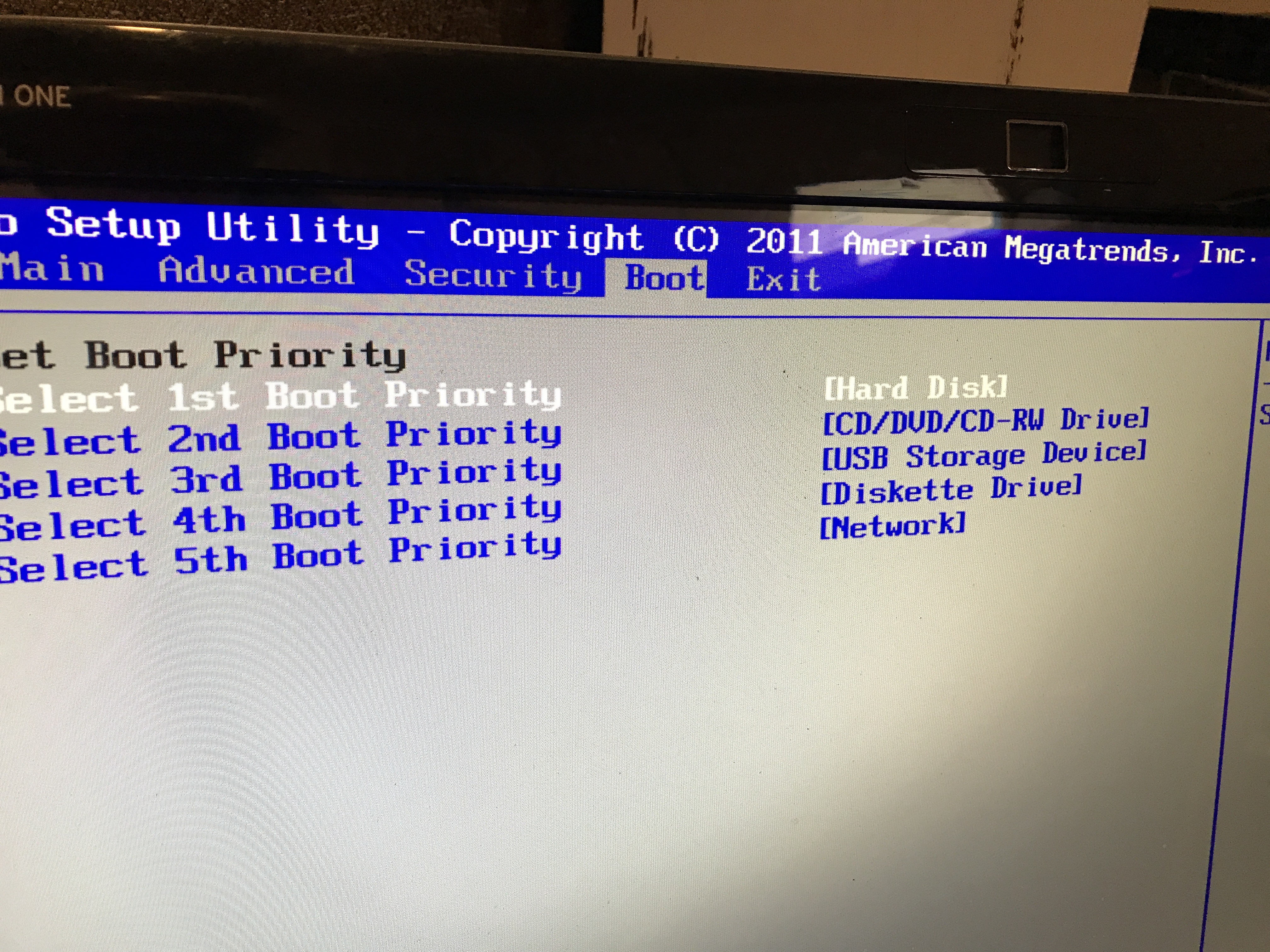
(not my pic)
Still Cuckin On Four Fours, Wrapped In Four Voes
08-06-2020, 05:03 AM
-
#15
- A-GAME
- Pedicabo ego vos et irrum
-
- A-GAME
- Pedicabo ego vos et irrum
- Join Date: Nov 2006
- Posts: 47,648
- Rep Power: 280053
-
-
I also downloaded the SP diagnostic tool but it can't find the SSD even though my computer is on and working right now (windows runs on the SSD). Coming up with a "device not found" message?
Still Cuckin On Four Fours, Wrapped In Four Voes
Bookmarks
-

- Digg
-

- del.icio.us
-

- StumbleUpon
-

-

Posting Permissions
- You may not post new threads
- You may not post replies
- You may not post attachments
- You may not edit your posts