
Forum
»
Reps for answers (photo layout editing?)
- Results 1 to 5 of 5
-
Page 1 of 1
 10-18-2020, 06:10 PM
-
#1
- travis976
- The Assman
-

- travis976
- The Assman
- Join Date: Mar 2006
- Location: United States
- Posts: 1,966
- Rep Power: 30739
-
-

Reps for answers (photo layout editing?)
I’m wanting to make a pic in this style but have no idea how to use photoshop or anything else. Is there an app or something that will make it easy to recreate this? Reps for answer’s
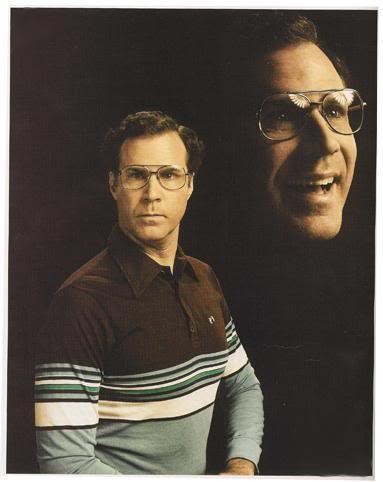
Bulldog Hard Nut
10-18-2020, 09:35 PM
-
#2
10-18-2020, 09:36 PM
-
#3
- 2020visionz
- Banned
-

- 2020visionz
- Banned
- Join Date: Aug 2020
- Posts: 1,704
- Rep Power: 0
-
-
Ask a miscer to do it
10-20-2020, 07:37 AM
-
#4
- KateAlexenko
- Registered User
-

- KateAlexenko
- Registered User
- Join Date: Oct 2020
- Age: 56
- Posts: 7
- Rep Power: 0
-
-
Hi, you can take a photo like this in Photoshop! You can use a dark phot for two photos, after that you overlay a photo with a large man and change the filter using the ditch camera filter, then overlay the head photo and also apply a filter, and if I understand correctly then there is a very transparent dark and grainy layer on top, you can create a layer by adjusting its transparency and then apply a texture. You can either create the texture yourself or google it on the Internet. And maybe you are interested in creating applications for photo editing, you can read about it in site Cleveroad articles "how to create a photo editing app"

Bookmarks
-

- Digg
-

- del.icio.us
-

- StumbleUpon
-

-

Posting Permissions
- You may not post new threads
- You may not post replies
- You may not post attachments
- You may not edit your posts