
Forum
»
 Any of you boys good with Math? Need some help. (Intervals)
Any of you boys good with Math? Need some help. (Intervals)
 09-28-2023, 04:16 PM
-
#1

- DonVonDuck
- Join Date: Aug 2013
- Posts: 8,749
- Rep Power: 40904
-
-

Any of you boys good with Math? Need some help. (Intervals)
I want to fill in the column between these two numbers, but I want the interval between the numbers to evenly progress as they go down.
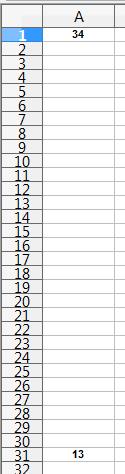
You boys understand what I'm saying? I don't want even intervals; I want them to increase by an even amount as they go down towards 13.
Here's an example. The intervals are in parenthesis:
53
(0.5)
52.5
(1)
51.5
(1.5)
50
(2)
48
(2.5)
45.5
(3)
42.5
(3.5)
39
(4)
35
(4.5)
30.5
(5)
25.5
(5.5)
20
(6)
14
How would I go about calculating this for two fixed numbers?
You boys understand what I'm saying? I don't want even intervals; I want them to increase by an even amount as they go down towards 13.
Here's an example. The intervals are in parenthesis:
53
(0.5)
52.5
(1)
51.5
(1.5)
50
(2)
48
(2.5)
45.5
(3)
42.5
(3.5)
39
(4)
35
(4.5)
30.5
(5)
25.5
(5.5)
20
(6)
14
How would I go about calculating this for two fixed numbers?
R.I.P. Bert
09-28-2023, 04:30 PM
-
#2
09-28-2023, 04:31 PM
-
#3

- Getter_done
- Join Date: Dec 2008
- Posts: 138,191
- Subscribers: 6
- Rep Power: 1140615
-
-
In b4 the math miscer
But in the meantime
The answer is 3.50
But in the meantime
The answer is 3.50
09-28-2023, 04:36 PM
-
#4

- DrewDarden
- Join Date: Nov 2016
- Posts: 23,029
- Subscribers: 5
- Rep Power: 508924
-
-
Originally Posted By Getter_done⏩
In b4 the math miscer
But in the meantime
The answer is 3.50
But in the meantime
The answer is 3.50


Misc Lifting Crew (Team Lead)
09-28-2023, 04:36 PM
-
#5
09-28-2023, 04:39 PM
-
#6
- Getter_done
- Join Date: Dec 2008
- Posts: 138,191
- Subscribers: 6
- Rep Power: 1140615
-
-
Originally Posted By DrewDarden⏩
Lmao based! Nice voice too.
09-28-2023, 04:39 PM
-
#7

- miscerForLulz
- Join Date: Aug 2016
- Posts: 8,455
- Rep Power: 50878
-
-
thought this said integrals and was gonna say wolfram alpha
intervals? not understanding this question OP
intervals? not understanding this question OP
2:136
Say, ˹O believers,˺ We believe in Allah and what has been revealed to us; and what was revealed to Abraham, Ishmael, Isaac, Jacob, and his descendants; what was given to Moses, Jesus, and other prophets from their Lord. We make no distinction between any of them. And to Allah we all submit.
09-28-2023, 04:39 PM
-
#8
- DonVonDuck
- Join Date: Aug 2013
- Posts: 8,749
- Rep Power: 40904
-
-
Originally Posted By DrewDarden⏩
That would be for an evenly spaced interval. The interval between every number would be the same if I took that route. That's not what I'm trying to do. I want the interval to progress evenly (see example above). In the example, each interval is 0.5 greater than the one above it.R.I.P. Bert
09-28-2023, 04:41 PM
-
#9
- ZyraThornrise
- is_woman = lambda: "thot"
-

- ZyraThornrise
- is_woman = lambda: "thot"
- Join Date: Jun 2014
- Location: Minnesota, United States
- Posts: 10,915
- Rep Power: 98800
-
-
Highlight the two numbers, select the fill handle (little square in the corner) then drag to the empty boxes in the column.
BrosefMengele is my #1 fan.
09-28-2023, 04:41 PM
-
#10
- DrewDarden
- Join Date: Nov 2016
- Posts: 23,029
- Subscribers: 5
- Rep Power: 508924
-
-
Originally Posted By DonVonDuck⏩
Oh my bad. I thought it seemed too easy. Yeah I'm not going to try that.That would be for an even interval. That's not what I'm trying to do. I want the interval to progress evenly (see example above).
I'm an English guy not a math guy.
Misc Lifting Crew (Team Lead)
09-28-2023, 04:44 PM
-
#11
- ZyraThornrise
- is_woman = lambda: "thot"
-
- ZyraThornrise
- is_woman = lambda: "thot"
- Join Date: Jun 2014
- Location: Minnesota, United States
- Posts: 10,915
- Rep Power: 98800
-
-
I'm looking at it and can't decide if excel or sheets, but just in case, you can also use the formula =A1 + ($B$1 - $A$1) / (N - 1) where A1 is the cell your start number is in, B1 is the end number and N is the number of cells to fill
BrosefMengele is my #1 fan.
09-28-2023, 04:48 PM
-
#12
- DonVonDuck
- Join Date: Aug 2013
- Posts: 8,749
- Rep Power: 40904
-
-
Originally Posted By ZyraThornrise⏩
Highlight the two numbers, select the fill handle (little square in the corner) then drag to the empty boxes in the column.
Originally Posted By ZyraThornrise⏩
I don't even know what you're saying, partner. I really don't.I'm looking at it and can't decide if excel or sheets, but just in case, you can also use the formula =A1 + ($B$1 - $A$1) / (N - 1) where A1 is the cell your start number is in, B1 is the end number and N is the number of cells to fill
R.I.P. Bert
09-28-2023, 04:49 PM
-
#13
- MrSchons
- Welsh Brah
-

- MrSchons
- Welsh Brah
- Join Date: Dec 2015
- Location: Wales, United Kingdom (Great Britain)
- Posts: 13,274
- Rep Power: 141586
-
-
Originally Posted By ZyraThornrise⏩
Or we could try please show bobs=true + please show vagene=trueI'm looking at it and can't decide if excel or sheets, but just in case, you can also use the formula =A1 + ($B$1 - $A$1) / (N - 1) where A1 is the cell your start number is in, B1 is the end number and N is the number of cells to fill
09-28-2023, 04:50 PM
-
#14
- ZyraThornrise
- is_woman = lambda: "thot"
-
- ZyraThornrise
- is_woman = lambda: "thot"
- Join Date: Jun 2014
- Location: Minnesota, United States
- Posts: 10,915
- Rep Power: 98800
-
-
Originally Posted By DonVonDuck⏩
Let me make dinner and I'll do a screen record for youI don't even know what you're saying, partner. I really don't.
I'm horrible at explaining things, sorry
Edit: What program are you using?
BrosefMengele is my #1 fan.
09-28-2023, 04:53 PM
-
#15
- jonmcd46
- Registered User
-

- jonmcd46
- Registered User
- Join Date: Sep 2012
- Location: United States
- Posts: 11,612
- Rep Power: 84813
-
-
Originally Posted By ZyraThornrise⏩
I'm not an excel expert, but it would probably be better if you tried it on excel, posted a link to the file to say its true. Because idk what that means exactly... and clearly no one else doesI'm looking at it and can't decide if excel or sheets, but just in case, you can also use the formula =A1 + ($B$1 - $A$1) / (N - 1) where A1 is the cell your start number is in, B1 is the end number and N is the number of cells to fill
09-28-2023, 04:54 PM
-
#16
 09-28-2023, 04:56 PM
-
#17
- BigGuyTruth
- Registered User
-

- BigGuyTruth
- Registered User
- Join Date: Mar 2023
- Age: 56
- Posts: 3,860
- Rep Power: 18732
-
-
Find the slope
09-28-2023, 04:58 PM
-
#18
- outfoxxed
- Registered User
-

- outfoxxed
- Registered User
- Join Date: Jun 2010
- Location: Toronto, Ontario, Canada
- Posts: 22,267
- Rep Power: 86921
-
-
Is that excel?
Not sure how to do it in excel cause i don't use it often
But the formula should be value of previous column - 0.5 (n)
If i were to do it in excel I'd do it in 2 columns
For A1, put 0.5. B1 put 1. Then use the excel drag tool and drag it all the way down. That's your increment
Not sure how to do it in excel cause i don't use it often
But the formula should be value of previous column - 0.5 (n)
If i were to do it in excel I'd do it in 2 columns
For A1, put 0.5. B1 put 1. Then use the excel drag tool and drag it all the way down. That's your increment
09-28-2023, 05:04 PM
-
#19
- outfoxxed
- Registered User
-
- outfoxxed
- Registered User
- Join Date: Jun 2010
- Location: Toronto, Ontario, Canada
- Posts: 22,267
- Rep Power: 86921
-
-
Originally Posted By ZyraThornrise⏩
This shouldn't work.I'm looking at it and can't decide if excel or sheets, but just in case, you can also use the formula =A1 + ($B$1 - $A$1) / (N - 1) where A1 is the cell your start number is in, B1 is the end number and N is the number of cells to fill
Any programmer knows you're begging for a divide by zero error
09-28-2023, 05:04 PM
-
#20
09-28-2023, 05:07 PM
-
#21
- AdvancedDreamer
- Registered Retard
-

- AdvancedDreamer
- Registered Retard
- Join Date: Nov 2014
- Posts: 12,955
- Rep Power: 91053
-
-
People still not using chatgpt lmao:
You can use a single formula to calculate the value for any column 'n' between your start number 'Start' and end number 'End' with 29 empty columns in between. Here's the formula:
Value at column n = Start + (n / 30) * (End - Start)
In this formula:
- 'n' is the position of the empty column, starting from 1 for the first empty column and increasing by 1 for each subsequent column.
- 'Start' is your starting number.
- 'End' is your ending number.
- The division by 30 evenly spreads the values between the start and end over the 29 empty columns.
For example, if your start number is 10 and your end number is 100, and you want to calculate the value for the 5th empty column:
Value at column 5 = 10 + (5 / 30) * (100 - 10) = 10 + (5 / 30) * 90 = 10 + (1/6) * 90 = 10 + 15 = 25
This formula will give you the value for any column between the start and end numbers with an even progression.
You can use a single formula to calculate the value for any column 'n' between your start number 'Start' and end number 'End' with 29 empty columns in between. Here's the formula:
Value at column n = Start + (n / 30) * (End - Start)
In this formula:
- 'n' is the position of the empty column, starting from 1 for the first empty column and increasing by 1 for each subsequent column.
- 'Start' is your starting number.
- 'End' is your ending number.
- The division by 30 evenly spreads the values between the start and end over the 29 empty columns.
For example, if your start number is 10 and your end number is 100, and you want to calculate the value for the 5th empty column:
Value at column 5 = 10 + (5 / 30) * (100 - 10) = 10 + (5 / 30) * 90 = 10 + (1/6) * 90 = 10 + 15 = 25
This formula will give you the value for any column between the start and end numbers with an even progression.
09-28-2023, 05:09 PM
-
#22
- ZyraThornrise
- is_woman = lambda: "thot"
-
- ZyraThornrise
- is_woman = lambda: "thot"
- Join Date: Jun 2014
- Location: Minnesota, United States
- Posts: 10,915
- Rep Power: 98800
-
-
Originally Posted By outfoxxed⏩
This shouldn't work.
Any programmer knows you're begging for a divide by zero error
Any programmer knows you're begging for a divide by zero error

OP, I'll just send you the file if you want it
Edit: Write the formula =A1 + ($A$31 - $A$1) / (30) into the first empty cell, then drag the formula down to the rest of them
BrosefMengele is my #1 fan.
09-28-2023, 05:15 PM
-
#23
- MrSchons
- Welsh Brah
-
- MrSchons
- Welsh Brah
- Join Date: Dec 2015
- Location: Wales, United Kingdom (Great Britain)
- Posts: 13,274
- Rep Power: 141586
-
-
Originally Posted By ZyraThornrise⏩
OP, I'll just send you the file if you want it
Edit: Write the formula =A1 + ($A$31 - $A$1) / (30) into the first empty cell, then drag the formula down to the rest of them
Please send bobs_vagene.jpgOP, I'll just send you the file if you want it
Edit: Write the formula =A1 + ($A$31 - $A$1) / (30) into the first empty cell, then drag the formula down to the rest of them
09-28-2023, 05:16 PM
-
#24
- ZyraThornrise
- is_woman = lambda: "thot"
-
- ZyraThornrise
- is_woman = lambda: "thot"
- Join Date: Jun 2014
- Location: Minnesota, United States
- Posts: 10,915
- Rep Power: 98800
-
-
Originally Posted By AdvancedDreamer⏩
Jesus, this confused me even more and I already knew the formula lolPeople still not using chatgpt lmao:
You can use a single formula to calculate the value for any column 'n' between your start number 'Start' and end number 'End' with 29 empty columns in between. Here's the formula:
Value at column n = Start + (n / 30) * (End - Start)
In this formula:
- 'n' is the position of the empty column, starting from 1 for the first empty column and increasing by 1 for each subsequent column.
- 'Start' is your starting number.
- 'End' is your ending number.
- The division by 30 evenly spreads the values between the start and end over the 29 empty columns.
For example, if your start number is 10 and your end number is 100, and you want to calculate the value for the 5th empty column:
Value at column 5 = 10 + (5 / 30) * (100 - 10) = 10 + (5 / 30) * 90 = 10 + (1/6) * 90 = 10 + 15 = 25
This formula will give you the value for any column between the start and end numbers with an even progression.
You can use a single formula to calculate the value for any column 'n' between your start number 'Start' and end number 'End' with 29 empty columns in between. Here's the formula:
Value at column n = Start + (n / 30) * (End - Start)
In this formula:
- 'n' is the position of the empty column, starting from 1 for the first empty column and increasing by 1 for each subsequent column.
- 'Start' is your starting number.
- 'End' is your ending number.
- The division by 30 evenly spreads the values between the start and end over the 29 empty columns.
For example, if your start number is 10 and your end number is 100, and you want to calculate the value for the 5th empty column:
Value at column 5 = 10 + (5 / 30) * (100 - 10) = 10 + (5 / 30) * 90 = 10 + (1/6) * 90 = 10 + 15 = 25
This formula will give you the value for any column between the start and end numbers with an even progression.
BrosefMengele is my #1 fan.
09-28-2023, 05:20 PM
-
#25
- outfoxxed
- Registered User
-
- outfoxxed
- Registered User
- Join Date: Jun 2010
- Location: Toronto, Ontario, Canada
- Posts: 22,267
- Rep Power: 86921
-
-
Originally Posted By ZyraThornrise⏩
OP, I'll just send you the file if you want it
Edit: Write the formula =A1 + ($A$31 - $A$1) / (30) into the first empty cell, then drag the formula down to the rest of them
Didn't realize for n = 1 that n actually equals 30OP, I'll just send you the file if you want it
Edit: Write the formula =A1 + ($A$31 - $A$1) / (30) into the first empty cell, then drag the formula down to the rest of them
09-28-2023, 05:22 PM
-
#26
- ZyraThornrise
- is_woman = lambda: "thot"
-
- ZyraThornrise
- is_woman = lambda: "thot"
- Join Date: Jun 2014
- Location: Minnesota, United States
- Posts: 10,915
- Rep Power: 98800
-
-
Originally Posted By outfoxxed⏩
Number of cells you want to fill minus 1Didn't realize for n = 1 that n actually equals 30
You can also write it as 31-1 and it'll function the same but I got lazy lol
BrosefMengele is my #1 fan.
09-28-2023, 05:30 PM
-
#27
09-28-2023, 05:35 PM
-
#28
- ZyraThornrise
- is_woman = lambda: "thot"
-
- ZyraThornrise
- is_woman = lambda: "thot"
- Join Date: Jun 2014
- Location: Minnesota, United States
- Posts: 10,915
- Rep Power: 98800
-
-
Originally Posted By jonmcd46⏩
Ah fukk. I read evenly spaced and blanked the restZyra you did well, but that wasn't the solultion OP was looking for...
he doesn't want a linear progression...
he doesn't want a linear progression...
You're right
I'm still cooking but I'll figure it out in a moment
BrosefMengele is my #1 fan.
09-28-2023, 05:43 PM
-
#29
- DuracellBunny
- Has new batteries!
-

- DuracellBunny
- Has new batteries!
- Join Date: Nov 2005
- Posts: 15,594
- Rep Power: 201320
-
-
just adapt factorials.
You would use n(n+1)/2 = x to add up integers
You already know what x would be (the total gain, which is 31) and you know how many steps you want (31), so you just have to apply a coefficient to the integer values, y.
y31(32)/2=31
y=1/16
so you get
13
13 + 1/16
13 + 1/16 + 2/16
13 + 1/16 + 2/16 + 3/16
etc
Edit, I misread and it's 21 not 31 so it would be
y31(32)/2=21
y = 42/992
so
13
13 + 42/992
13 + 42/992 + 2x42/992
13 + 42/992 + 2x42/992 + 3x42/992
etc
You would use n(n+1)/2 = x to add up integers
You already know what x would be (the total gain, which is 31) and you know how many steps you want (31), so you just have to apply a coefficient to the integer values, y.
y31(32)/2=31
y=1/16
so you get
13
13 + 1/16
13 + 1/16 + 2/16
13 + 1/16 + 2/16 + 3/16
etc
Edit, I misread and it's 21 not 31 so it would be
y31(32)/2=21
y = 42/992
so
13
13 + 42/992
13 + 42/992 + 2x42/992
13 + 42/992 + 2x42/992 + 3x42/992
etc
Screw nature; my body will do what I DAMN WELL tell it to do!
The only dangerous thing about an exercise is the person doing it.
They had the technology to rebuild me. They made me better, stronger, faster......
09-28-2023, 06:07 PM
-
#30

- MustardTiger17
- Join Date: Dec 2012
- Location: United States
- Posts: 38,603
- Subscribers: 7
- Rep Power: 238919
-
-
How about no
Not in the AM
Bookmarks
-

- Digg
-

- del.icio.us
-

- StumbleUpon
-

-

Posting Permissions
- You may not post new threads
- You may not post replies
- You may not post attachments
- You may not edit your posts